

Your sounds.
One tap away.
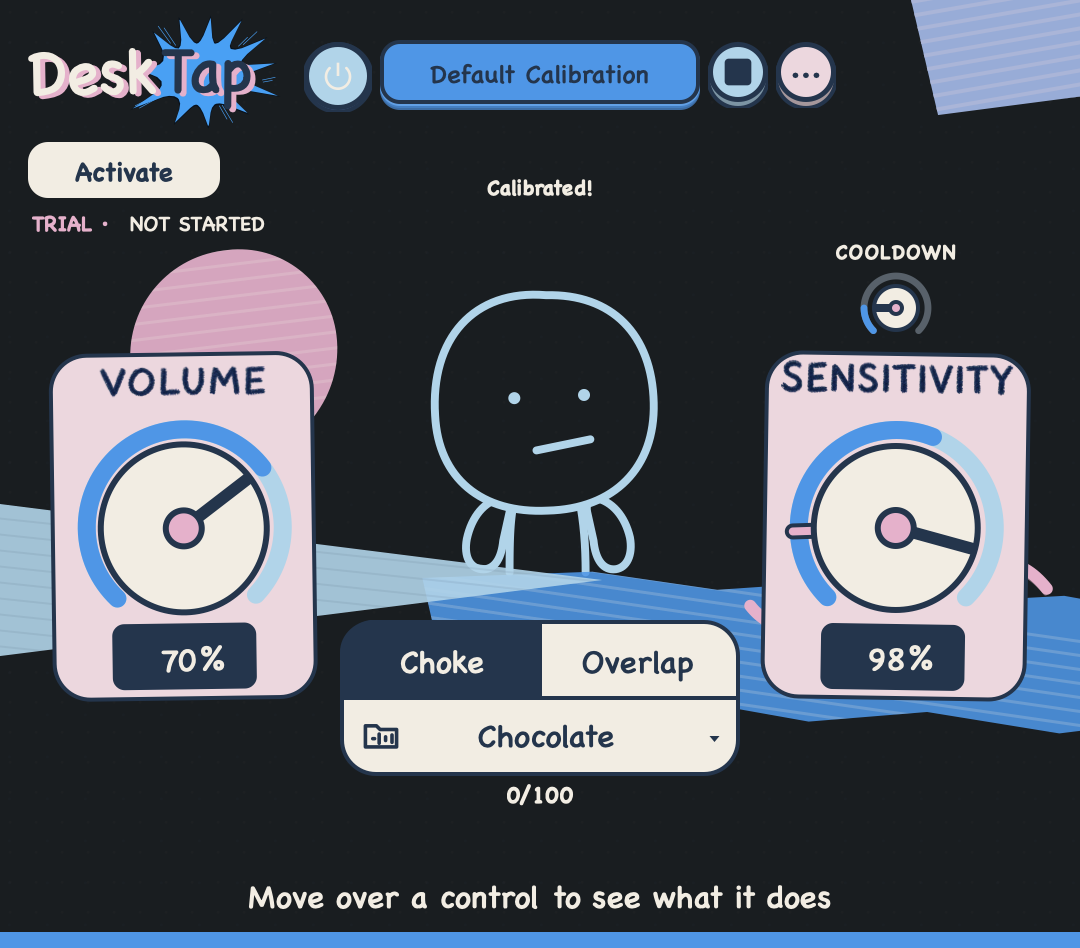
After activation, choose a folder of supported short audio files. Tap the desk—or give your MacBook a light fingertip tap. DeskTap triggers one sound from the selected pack when it detects a tap.
macOS 14.6 or later · M1 Pro or newer MacBook
Your folder becomes the pack.
After activation, pick 1 to 78 supported audio files from one folder. A kick, a voice memo, a door slam—choose them yourself and swap the folder whenever you like. DeskTap also opens ready-made.desktappack files.
DeskTap does not grant rights to audio you load. Use sounds you own or have permission to use, including when sharing or selling a.desktappack.
- 1Choose
Start with a built-in pack, or activate to use your folder.
- 2Calibrate
Use the built-in default, or recalibrate for this desk and placement.
- 3Tap
Each detected tap triggers one sound from the selected pack.
Start with 101 sounds.
Nine packs are built in. The trial includes up to 100 audible plays per pack; bring your own after activation.
- 01Chocolate13 sounds
- 02Wax19 sounds
- 03Sticky Keyboard14 sounds
- 04Keyboard20 sounds
- 05Bubble Wrap15 sounds
- 06Nailgun8 sounds
- 07Driver6 sounds
- 08Whiplash1 sound
- 09Man5 sounds
A few controls. No setup maze.
Start tapping, then change only what feels useful.
- Sensitivity
- Choose how light or firm a tap DeskTap should hear.
- Stop or overlap
- Cut the last sound off, or let several sounds ring together.
- Shuffle without quick repeats
- Packs with multiple sounds play through the pack before DeskTap starts over.
- Local by default
- Motion and calibration data stay on your Mac.
macOS 14.6+.
M1 Pro+ MacBook.
The recorded hands-on setup is a MacBook Pro (M1 Pro) on macOS 26.5.2, using the built-in speakers at 48 kHz with a 256- or 512-sample buffer. Other combinations in the declared range have not all been tested individually, so use the three-day trial on your exact Mac. Bluetooth and external audio interfaces are not supported. DeskTap may also hear typing, cable bumps and other desk vibration, so adjust Sensitivity when needed.
Light. Medium. Firm—but always controlled.During calibration, use controlled taps that represent the range you normally expect to use. “Firm” means the upper end of that normal range—not excessive force. During general use, stay within a similar controlled range. When tapping the MacBook directly, use only a light, controlled tap with a bare fingertip.
To the extent permitted by law, GridWave DSP is not responsible for hardware damage caused by excessive force, repeated high-energy impacts, hard objects, drops, unstable placement or other use outside these instructions, whether the impact is direct or transmitted through a supporting surface. Mandatory consumer rights and non-excludable liability are not limited.
 One app. One payment.
$7.99$4.99
Limited-time offer
One-time purchase
Buy DeskTap 1.0.0 once and use it on one active Mac. The three-day trial includes up to 100 audible plays per built-in pack; your own sample folders unlock after activation.
Please use the three-day evaluation before purchasing. It checks sensor access, detection and all nine built-in packs; custom sample loading requires a paid licence and cannot be tested during the evaluation. GridWave DSP does not offer a voluntary change-of-mind refund after purchase. Qualifying product issues, mandatory consumer rights, Polar remedies and card-network rights are handled separately under the Refund Policy.
Buy DeskTap — $4.99Activate with your Polar purchase email and license key. DeskTap keeps working offline for up to 72 hours after validation.
Checkout and payment are handled by Polar Software, Inc., our merchant of record and authorized reseller. Policy Version 1.1 applies only to qualifying orders as described in the linked terms.
Questions?
Can I use my own samples?
Yes, after activation. Choose one folder containing 1 to 78 supported audio files or open a .desktappack. The trial includes all nine factory packs, with up to 100 audible plays per pack, but it cannot load or play your custom samples. Review the published custom-pack formats and limits before purchase.
What Mac do I need?
A MacBook with an M1 Pro chip or newer, running macOS 14.6 or later. The recorded hands-on setup is a MacBook Pro (M1 Pro) on macOS 26.5.2, using the built-in speakers at 48 kHz with a 256- or 512-sample buffer. Other combinations in the declared range have not all been tested individually, so use the trial on your exact Mac. Bluetooth and external audio interfaces are not supported in this release.
When does the three-day trial start?
Only after you confirm Start trial & Power on and DeskTap completes its first successful Power On. It includes up to 100 audible plays per factory pack; your own sample folders unlock after activation.
Will normal typing trigger it?
It can. DeskTap feels vibration, not intention. Turn Sensitivity down, recalibrate, or switch Power off when you are not playing.
Can I tap the MacBook itself?
Yes. Use a light, controlled tap with a bare fingertip while the MacBook is fully supported on a stable, flat surface. You can tap the desk instead—it is the lower-risk option. Use the lightest force that works and stop if the MacBook moves, slides, flexes, overheats or behaves abnormally. Be careful not to damage your MacBook.
Can I move my license to another Mac?
Yes. One Mac can be active at a time. Deactivate the current Mac in the Polar customer portal, then activate the new one.
What if DeskTap does not work on my Mac?
Try the three-day trial on your exact Mac first. Policy Version 1.1 does not offer a voluntary change-of-mind refund after purchase. This is not an unconditional no-refunds rule. If an advertised function of the purchased DeskTap product is materially unavailable on the official 1.0.0 build and a configuration represented as supported for your purchase, we will investigate using reasonable and proportionate troubleshooting. Eligibility and any voluntary exclusion are determined under the linked Refund Policy. If its eligibility criteria are met, no applicable voluntary exclusion is established, and the function cannot be restored within a reasonable time without significant inconvenience, we will arrange a refund through Polar. Mandatory consumer rights, Polar remedies and card-network rights are not limited.
Where can I get support?
Email contact@gridwavedsp.com and we will help you out.